Seating Plan Tips That Will Save Your Sanity (And How Wedmin Makes It Easy)
Ask any couple what part of wedding planning surprised them the most, and a good number of them will say the seating plan. From the outside it sounds straightforward enough. You have some tables, you have some guests, you put people together. Done.
In reality, the seating plan is one of the most logistically complex parts of the entire wedding. It is also one of the most emotionally loaded. You are navigating family dynamics, friendship groups, dietary requirements, mobility needs, and the very particular social mathematics of who can and cannot sit near each other. All while trying to create an atmosphere where everyone feels considered and included.
As a professional wedding planner, I have helped hundreds of couples through this exact process. The same mistakes come up again and again, and the same solutions work every time. Here is everything I know, plus how Wedmin's guest list and seating features take the hard work out of the whole thing.
The Problem With Spreadsheets
Before we get into the tips, let's talk about the tool most couples use to manage their guest list and seating plan. The humble spreadsheet.
It starts well. You add names, you add a column for RSVPs, you add another for dietary requirements. Then someone cancels and you have to restructure three rows. Then a plus one gets added and suddenly your table numbers are off. Then your partner edits a different version and you spend an evening merging two files that have quietly diverged.
This is not a you problem. This is a spreadsheet problem. Spreadsheets are not built for the dynamic, constantly-changing nature of a wedding guest list. And they certainly are not built to connect your RSVPs to your seating plan automatically.
Wedmin is. Here is how it works in practice.
Inside Wedmin's Seating Planner
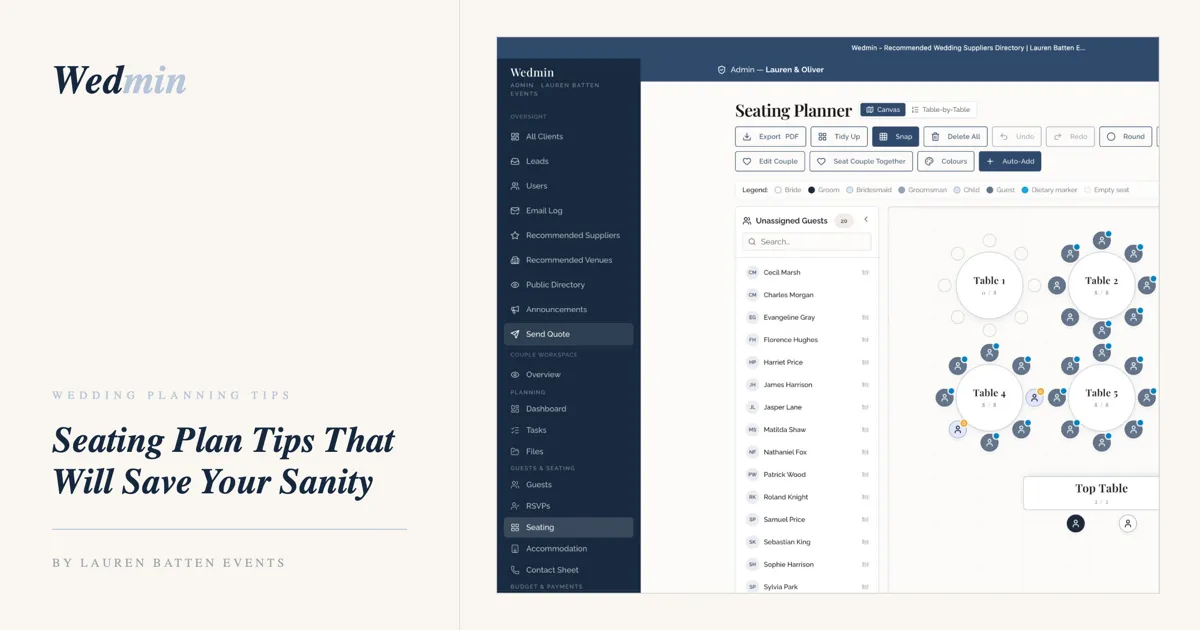
Wedmin's seating planner is a visual canvas where you can see your entire reception layout at once. Your tables sit in the room exactly as they will on the day — round tables, long tables, a top table — and you drag guests from the unassigned panel on the left directly onto their seat. No formulas, no row numbers, no guesswork.
Every guest is colour coded by their role so you can see the shape of the room at a glance. Bride, groom, bridesmaids, groomsmen, children, and general guests each have their own colour. Dietary requirements are flagged automatically with a marker on the guest's icon, so you never have to cross-reference a separate list to brief your caterer.
The unassigned guests panel on the left shows everyone who still needs a seat, with a live count so you always know exactly how many people are left to place. You can search by name, which is genuinely useful when you are working with a large guest list and need to find someone quickly.
When you are done, you export the whole plan as a PDF in one click. It is ready to hand to your venue coordinator, your caterer, or whoever is managing the room on the day.
There is also an Auto-Add function that places unassigned guests into available seats for you, which is a useful starting point if you want to see a rough arrangement before you start making intentional decisions. And if you want to seat a couple together with a single action, there is a button for that too.
When something changes, and something always changes, you update it in the canvas and it reflects immediately. No rebuilding, no merging, no version confusion.
Tip 1: Start Later Than You Think
The most common seating plan mistake is starting too early. Your seating plan is only as accurate as your confirmed guest list, and that list keeps moving right up until a few weeks before the wedding.
Use Wedmin to track your RSVPs in real time so you always know exactly where your numbers stand. The moment a guest responds, you log it. You can see at a glance how many have confirmed, how many have declined, and how many still have not replied. When you hit around 90 percent confirmed, that is your signal to start the seating plan in earnest.
Until then, use the guest list feature to build your full picture. Add notes against individual guests, flag anyone who needs special consideration, and group people in your head before you commit anything to a plan.
Tip 2: Think About the Room, Not Just the Tables
Where a table sits in the room matters just as much as who is at it. These are the placements I always think through first:
Elderly guests and guests with mobility needs belong close to the entrance and the bathrooms, away from speakers and away from the back of the room.
Families with young children do best near an exit so parents can step out easily without disrupting the room.
Guests who do not know many people need at least one warm, naturally sociable person at their table who will draw them in.
Guests you want to feel especially close to you should be near the front. Proximity to the top table says something without you having to say anything.
In Wedmin you can add notes to each guest that carry through to the seating view. So if you have flagged that a guest uses a wheelchair, or that two guests should not be near each other, that information is visible when you are placing people. You are not relying on memory or a separate notes document.
Tip 3: Group by Energy, Not Just by How You Know People
The instinct is to seat all your university friends together, your work colleagues together, your partner's family together. This feels logical but it often makes for a less interesting experience for your guests.
Think instead about personality. Which of your friends would thrive at a table with people they have never met? Which family member is naturally warm enough to anchor a table of mixed guests? A well-mixed table where people genuinely connect is far more memorable than one where everyone already knows everything about each other.
Because Wedmin holds all of your guest information in one place, you can look across your full list when you are making these decisions. You are not trying to hold 120 names in your head. You can see everyone, filter, and think clearly about who belongs where.
Tip 4: Have the Family Conversation Early
Before you finalise anything, have a quiet conversation with whoever knows the family dynamics best. Ask directly whether there is anyone who should not be seated near each other. You do not need to take sides or go into detail. You just need the information.
Once you have it, add a note in Wedmin against the relevant guests so it is visible when you are building the plan. You will not forget it, and you will not accidentally place two people together who have not spoken in years.
Tip 5: Build a Buffer
Something will change between the moment you finalise your plan and the day itself. A guest will cancel last minute. Someone will bring a child you were not expecting. This is not a planning failure, it is just reality.
Keep a small number of flex seats available and make sure your venue coordinator knows about them. In Wedmin you can see your total confirmed headcount against your total seat capacity at all times, so you always know exactly what room you have to absorb a change.
Tip 6: Brief Your On-the-Day Contact
Once your seating plan is finalised, your venue or on-the-day coordinator needs a copy they can work from. Wedmin keeps your plan in one place and easy to share, so there is no scrambling to pull together a final version from multiple documents the week before your wedding.
Everything is there. Your confirmed guest list. Your dietary requirements. Your table assignments. Your supplier contacts. It is all connected, and it is all accessible when you need it.
Your Seating Plan Does Not Have to Be the Hardest Part
The seating plan has a reputation it does not entirely deserve. Yes, it takes thought. Yes, it requires some difficult decisions. But with the right approach and the right tool, it is genuinely manageable.
Wedmin gives you a guest list and seating plan that work together the way they should have always worked. No more spreadsheets that fall apart when something changes. No more hunting through three different documents to find the information you need. Just a clear, connected system that keeps up with your planning as it evolves.
Join free at app.laurenbattenevents.com/join and see the difference for yourself.
With love,
Lauren x
Frequently Asked Questions
How does Wedmin's guest list feature work?
You add your guests to Wedmin once and all of their details, including RSVPs, dietary requirements, accommodation, and any notes, are stored in one place. When you are ready to build your seating plan, that information is already there. Everything is connected so you never have to copy data across or manage multiple files.
Can I track RSVPs in Wedmin?
Yes. You can log and track every RSVP directly in Wedmin so you always have an accurate, up-to-date picture of your confirmed guest numbers. No more chasing responses across text messages and emails and trying to remember who said what.
When should I start building my seating plan?
Wait until around 90 percent of your RSVPs are confirmed. Starting earlier means rebuilding the plan multiple times as responses come in. Use Wedmin to track your RSVPs in real time so you know exactly when you have enough confirmed numbers to start placing people.
Do I need to assign individual seats or just tables?
In most cases, assigning tables is enough. Guests can find their own seat within their allocated table, which creates a more relaxed atmosphere and takes significant pressure off you. Individual seat assignments are only really needed for very formal settings or guests with specific requirements.
How do I handle guests who should not be seated near each other?
Have a conversation with your family before you start the plan so you know the full picture. In Wedmin you can add notes against individual guests that stay visible when you are building the seating plan, so you will not accidentally overlook an important consideration.
What happens if a guest cancels after I have finalised the plan?
In Wedmin you update the guest list and the seating plan reflects the change immediately. There is no separate document to adjust or spreadsheet to restructure. Keep a few flex seats available in your plan to absorb last-minute changes without needing to rearrange everything.
Is Wedmin free to use?
Yes. All 22 features, including the guest list, RSVPs, accommodation tracker, and seating plan, are completely free. No credit card required, no hidden costs, no features locked behind a paywall.
Ready to make your guest list and seating plan the easiest part of wedding planning?
Join Wedmin free at app.laurenbattenevents.com/join
Are you a wedding supplier?
Apply to join the Wedmin directory at app.laurenbattenevents.com/supplier/join

